CADianHelp Center
메뉴
  • CADian Release History
  • User Accounts
      • Sign Up (Create Account)
      • Sign In
      • 2-Step Sign In
      • Find Email Account
      • Find Password
      • Change Email Account
      • Change Password
      • 2-Step Verification
      • Delete Account
      • Restore Account
      • Login with ID
      • Find ID
      • Find Password
      • Find Email Address
      • Switch to Email
  • My Page
      • Change Email Account
      • Change Password
      • 2-Step Verification
      • Delete Account
      • Restore Account
      • Profile Image
      • Nickname
      • Name
      • Birthday
      • User Phone
      • Recovery Email
      • Industry
      • Company
      • Department
      • Change Language
      • Newsletter Subscription
      • Order History
      • Cart
      • Register Product
      • My Products
      • List
      • Register
  • License
    • Download CADian
    • Install CADian
    • Register License
    • Authorize Trial
  • File Manager
    • What's New
    • FAQ
      • Access
      • Browsers
      • Languages
      • Create Account
      • Sign In
      • Profile Settings
      • Create Folders
      • Upload Files
      • Download Files
      • File List
      • Open Files
      • Rename Items
      • Copy Files
      • Move Files
      • Delete Items
      • Share Items
      • Starred Items
      • Trash
      • Search
      • Storage
  • Web Viewer
    • What's New
    • FAQ
      • Access
      • Browsers
      • Languages
      • Create Account
      • Sign In
      • Profile Settings
      • Zoom and Pan
      • 3D Orbit
      • Switching Views
      • Selecting Entities
      • Properties
      • Layers
      • Model and Layout
      • Ruler
      • Text
      • Display and Hide UI
  • File Converter
    • What's New
    • FAQ
      • Create Account
      • Sign In
      • Profile Settings
      • Access
      • Browsers
      • Languages
      • File Types
      • File Upload
      • File Convert
  • Organization Console
    • Introduction
      • Create Organization
      • Organization Dashboard
      • View Members
      • Invite Member
      • Change Role & Remove
      • Transfer Ownership
      • View Groups
      • Create Group
      • Edit & Delete Group
      • View Serials
      • Register Serial
      • Remove Serial
      • Organization Info & Domain
      • Delete Organization
      • Activity Log
      • Member View Guide
      • Organization FAQ
  1. Help Center
  2. User Accounts
  3. email-accounts
  4. Change Password
Change Password

How to change your Password

  1. Sign in to the CADian web service.

  2. Click on the profile image in the upper right corner to access the My Page menu.

  3. Navigate to the Sign In & Security page > Sign In Credentials section > Password field

  4. Click the edit button at the far right of your Password.

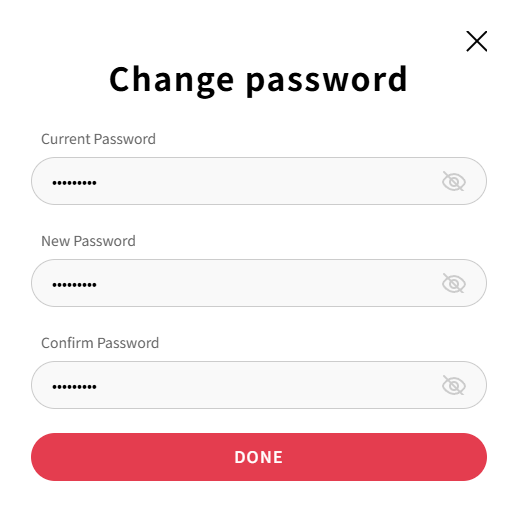
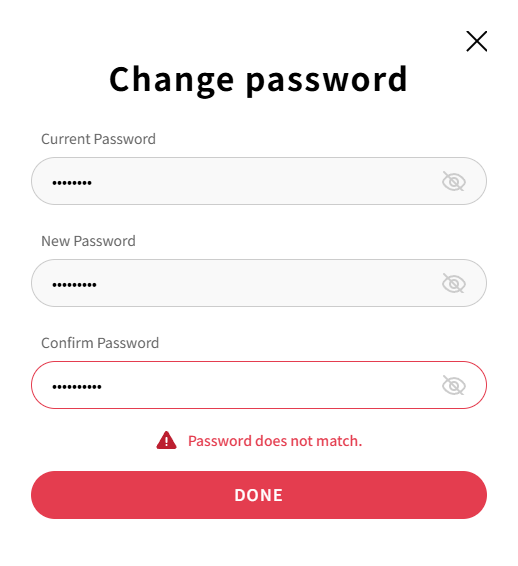
  5. When the Change password modal opens, enter the following:

    Tip: Click the eye icon to unmark the password and check what you entered.

    1. Current Password

    2. New Password

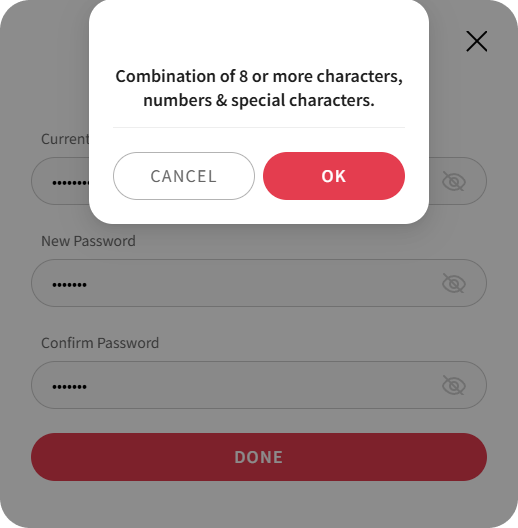
      ※ The new password must meet all the following requirements:

      • At least 8 characters long

      • Includes at least one alphabet and one number

      • Includes at least one special character

      • Special characters exception: password must not include #, %, &, +

    3. Confirm New Password

      Change password modal screen

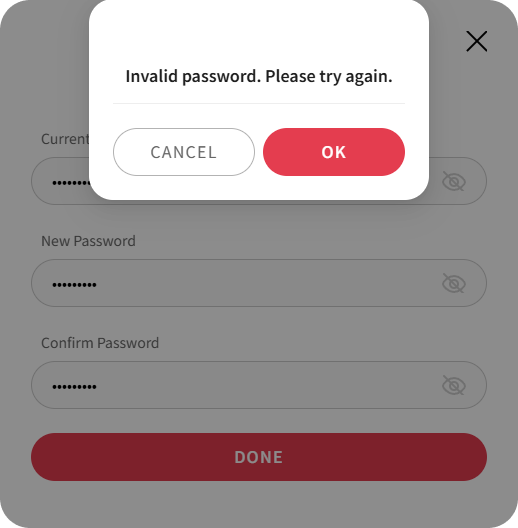
      Enter current password screen

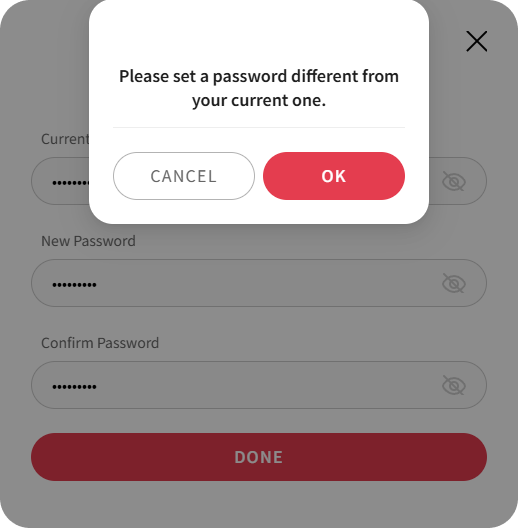
      Enter new password screen

      Error message: Invalid password format

      Password change successful screen

  6. After entering abiding by the password rules, click the DONE button to change the password.

Note:
If you don't remember your password during login, you can reset your password.

PreviousChange Email AccountNext2-Step Verification
Copyrightⓒ Wizcore, Inc. All Rights Reserved.
Terms of ServicePrivacy Policy
메뉴
  • CADian Release History
  • User Accounts
      • Sign Up (Create Account)
      • Sign In
      • 2-Step Sign In
      • Find Email Account
      • Find Password
      • Change Email Account
      • Change Password
      • 2-Step Verification
      • Delete Account
      • Restore Account
      • Login with ID
      • Find ID
      • Find Password
      • Find Email Address
      • Switch to Email
  • My Page
      • Change Email Account
      • Change Password
      • 2-Step Verification
      • Delete Account
      • Restore Account
      • Profile Image
      • Nickname
      • Name
      • Birthday
      • User Phone
      • Recovery Email
      • Industry
      • Company
      • Department
      • Change Language
      • Newsletter Subscription
      • Order History
      • Cart
      • Register Product
      • My Products
      • List
      • Register
  • License
    • Download CADian
    • Install CADian
    • Register License
    • Authorize Trial
  • File Manager
    • What's New
    • FAQ
      • Access
      • Browsers
      • Languages
      • Create Account
      • Sign In
      • Profile Settings
      • Create Folders
      • Upload Files
      • Download Files
      • File List
      • Open Files
      • Rename Items
      • Copy Files
      • Move Files
      • Delete Items
      • Share Items
      • Starred Items
      • Trash
      • Search
      • Storage
  • Web Viewer
    • What's New
    • FAQ
      • Access
      • Browsers
      • Languages
      • Create Account
      • Sign In
      • Profile Settings
      • Zoom and Pan
      • 3D Orbit
      • Switching Views
      • Selecting Entities
      • Properties
      • Layers
      • Model and Layout
      • Ruler
      • Text
      • Display and Hide UI
  • File Converter
    • What's New
    • FAQ
      • Create Account
      • Sign In
      • Profile Settings
      • Access
      • Browsers
      • Languages
      • File Types
      • File Upload
      • File Convert
  • Organization Console
    • Introduction
      • Create Organization
      • Organization Dashboard
      • View Members
      • Invite Member
      • Change Role & Remove
      • Transfer Ownership
      • View Groups
      • Create Group
      • Edit & Delete Group
      • View Serials
      • Register Serial
      • Remove Serial
      • Organization Info & Domain
      • Delete Organization
      • Activity Log
      • Member View Guide
      • Organization FAQ