CADianHelp Center
메뉴
  • CADian Release History
  • User Accounts
      • Sign Up (Create Account)
      • Sign In
      • 2-Step Sign In
      • Find Email Account
      • Find Password
      • Change Email Account
      • Change Password
      • 2-Step Verification
      • Delete Account
      • Restore Account
      • Login with ID
      • Find ID
      • Find Password
      • Find Email Address
      • Switch to Email
  • My Page
      • Change Email Account
      • Change Password
      • 2-Step Verification
      • Delete Account
      • Restore Account
      • Profile Image
      • Nickname
      • Name
      • Birthday
      • User Phone
      • Recovery Email
      • Industry
      • Company
      • Department
      • Change Language
      • Newsletter Subscription
      • Order History
      • Cart
      • Register Product
      • My Products
      • List
      • Register
  • License
    • Download CADian
    • Install CADian
    • Register License
    • Authorize Trial
  • File Manager
    • What's New
    • FAQ
      • Access
      • Browsers
      • Languages
      • Create Account
      • Sign In
      • Profile Settings
      • Create Folders
      • Upload Files
      • Download Files
      • File List
      • Open Files
      • Rename Items
      • Copy Files
      • Move Files
      • Delete Items
      • Share Items
      • Starred Items
      • Trash
      • Search
      • Storage
  • Web Viewer
    • What's New
    • FAQ
      • Access
      • Browsers
      • Languages
      • Create Account
      • Sign In
      • Profile Settings
      • Zoom and Pan
      • 3D Orbit
      • Switching Views
      • Selecting Entities
      • Properties
      • Layers
      • Model and Layout
      • Ruler
      • Text
      • Display and Hide UI
  • File Converter
    • What's New
    • FAQ
      • Create Account
      • Sign In
      • Profile Settings
      • Access
      • Browsers
      • Languages
      • File Types
      • File Upload
      • File Convert
  • Organization Console
    • Introduction
      • Create Organization
      • Organization Dashboard
      • View Members
      • Invite Member
      • Change Role & Remove
      • Transfer Ownership
      • View Groups
      • Create Group
      • Edit & Delete Group
      • View Serials
      • Register Serial
      • Remove Serial
      • Organization Info & Domain
      • Delete Organization
      • Activity Log
      • Member View Guide
      • Organization FAQ
  1. Help Center
  2. User Accounts
  3. id-accounts
  4. Switch to Email
Switch to Email

As of April 2024, CADian website has been renewed and the account system has changed from old ID to Email format.

In order to use CADian web services, all users must either switch to an email account or sign up with an email-based account.

Preliminary Step - ID Login

  1. First, log in with your old ID referring to the ID Login page.

  2. Click the SWITCH TO EMAIL button to start the account switch process.
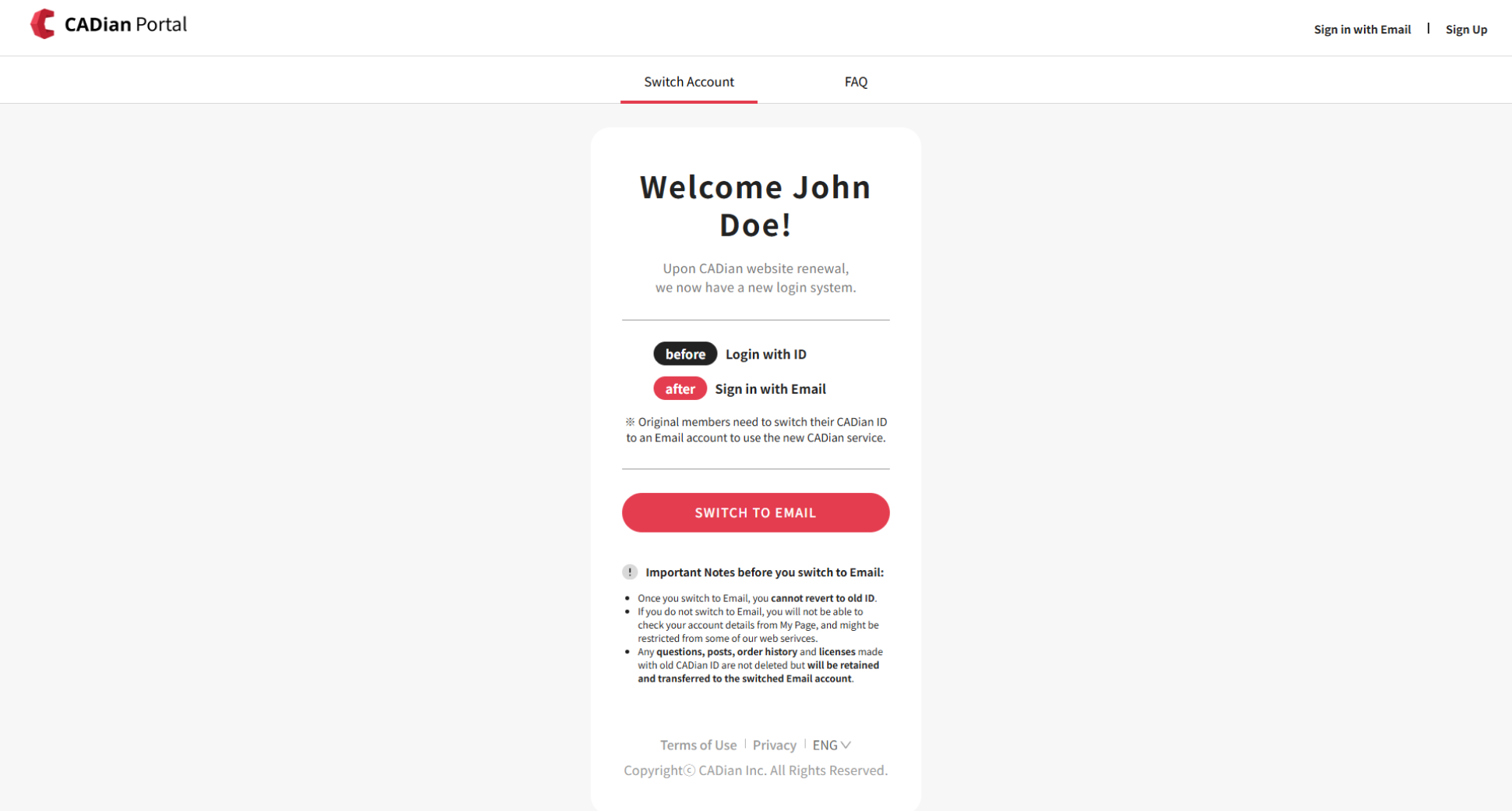
    Switching ID to Email Account - Start

Step 1 - Set Email

  1. Enter the email address you will use as your CADian account and click the Check Duplicate button to verify if the email is available.

    • If the email address is already in use, you might have already switched account, or created a new account with this email.
      Please proceed with Find Email Account.
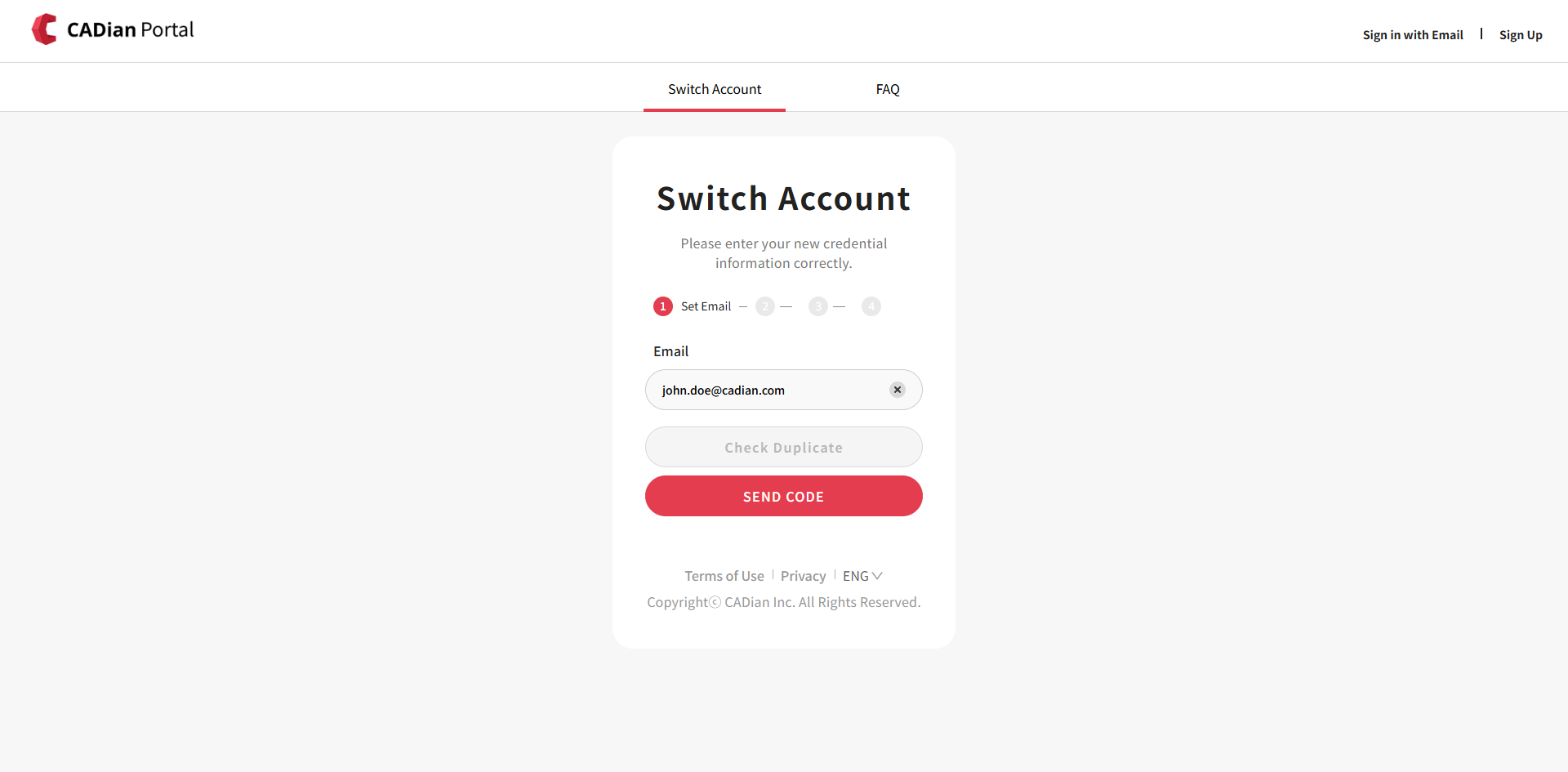
    Switching ID to Email Account - Check email is available for use

  2. If the email is available, click the SEND CODE button and we will send you a 6-digit verification code to the entered email.
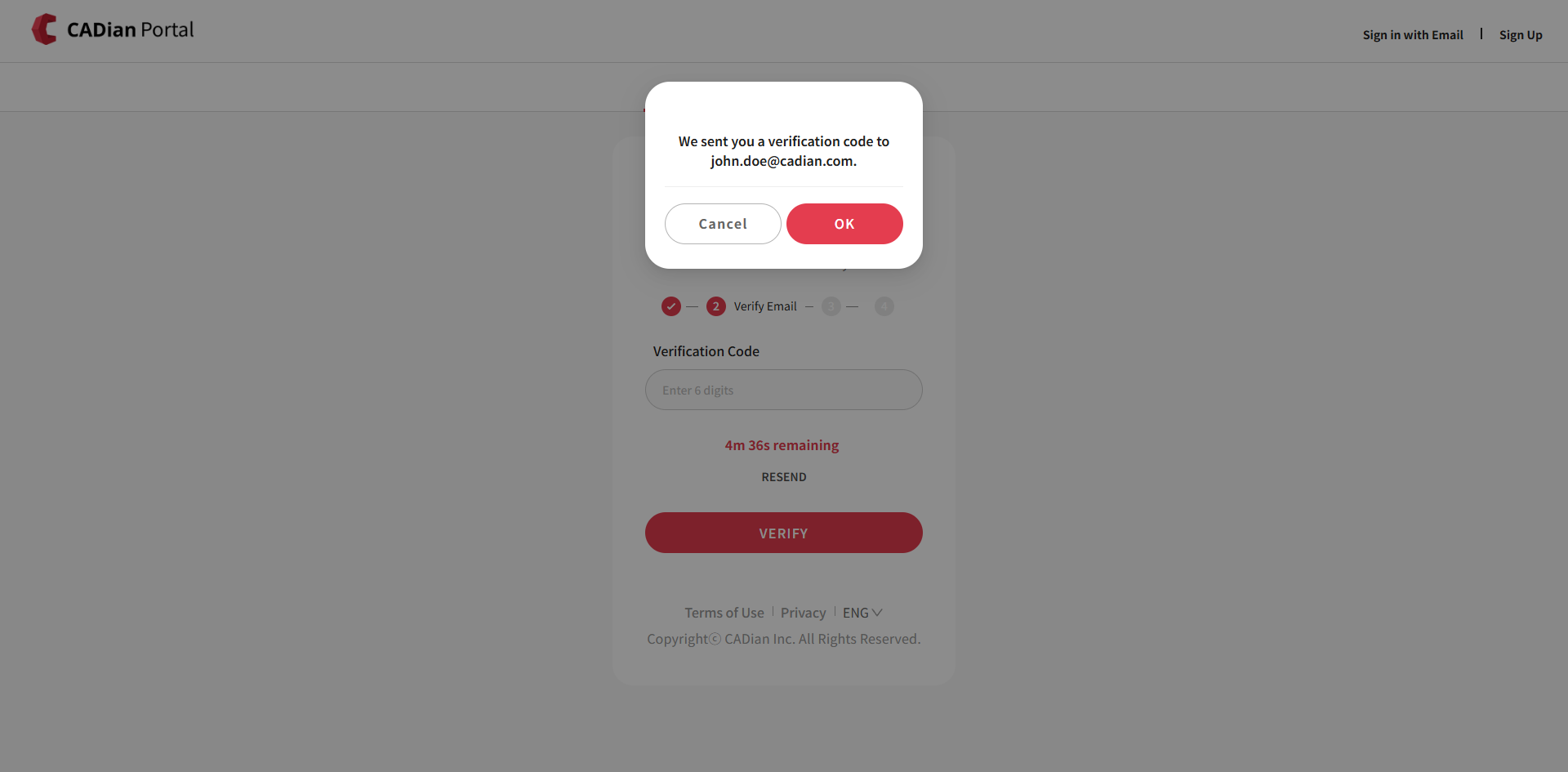
    Switching ID to Email Account - Verification code sent

Step 2 - Verify Email

  1. Enter the 6-digit verification code received in your email and click the VERIFY button to verify your email address.

    • The email might be delayed depending on the internet connection. Please wait a moment if it does not arrive immediately.

    • If you still do not receive the email, first check the Spam Mailbox.

    • Alternatively, you can click the RESEND button to receive a new code.

Step 3 - Change Password

  1. Set a new password and confirm it by entering it again.
    ※ The password must meet all of the following criteria:

    • At least 8 characters

    • Includes at least one alphabet and one number

    • Includes at least one special character

    • Must not include the following special characters: #, %, &, +

  2. Check the boxes to agree to the Terms of use, Privacy and Marketing consent, then click the COMPLETE button.
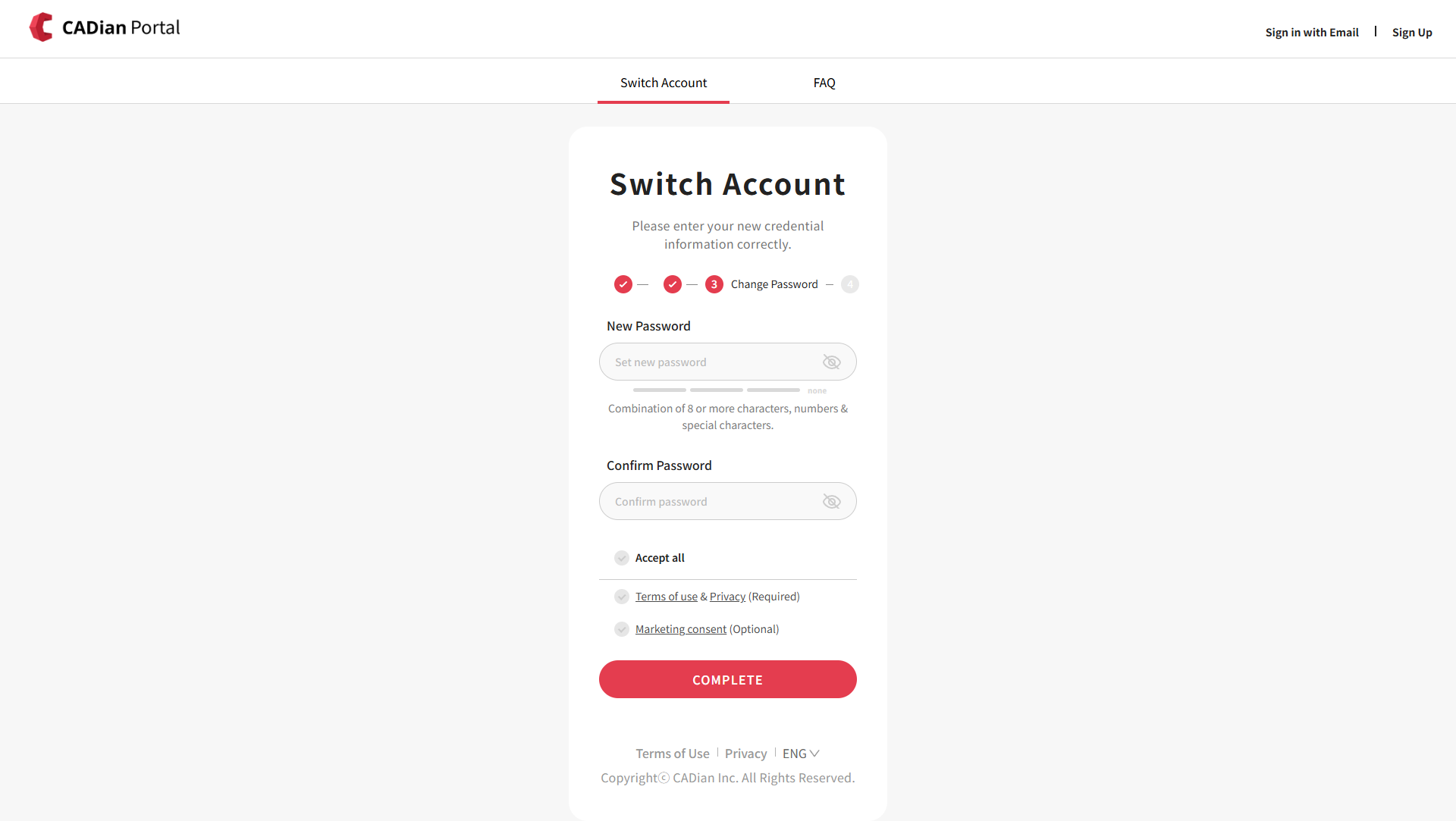
    Switching ID to Email Account - Change password and agree to terms

Step 4 - Completed

If you see the Completed page, you have successfully completed switching your account.
The old ID account can no longer be used, and you can now sign in with your email account.
A confirmation email regarding account switch completion will be sent to you.

FAQs

What are the benefits of switching to an email account?

Email account is easy to remember and can be used in various services which allows users to easily manage their accounts.

In addition, when you switch your old CADian ID to an email account, you can use many different kinds of CADian services with a single email address, as well as receive notifications by email.

Moreover, email accounts allow you to reset your password with your email address, making it easy to find your password even if you don't remember it. It also provides additional security options such as email verification and 2-step verification.

What happens if I do not switch to an email account?

If you do not switch your ID to an email account, you will not be able to check your account details from My Page, and you will be restricted from all CADian web services.

Additionally, old ID accounts are difficult to recover in case you forgot your password, as well as unable to receive important email notifications regarding our services.

For these reasons, we recommend that you switch to an email account by referring to the Switch to an Email Account Steps above.

PreviousFind Email Address
Copyrightⓒ Wizcore, Inc. All Rights Reserved.
Terms of ServicePrivacy Policy

Switch to Email

  • Preliminary Step - ID Login
  • Step 1 - Set Email
  • Step 2 - Verify Email
  • Step 3 - Change Password
  • Step 4 - Completed
메뉴
  • CADian Release History
  • User Accounts
      • Sign Up (Create Account)
      • Sign In
      • 2-Step Sign In
      • Find Email Account
      • Find Password
      • Change Email Account
      • Change Password
      • 2-Step Verification
      • Delete Account
      • Restore Account
      • Login with ID
      • Find ID
      • Find Password
      • Find Email Address
      • Switch to Email
  • My Page
      • Change Email Account
      • Change Password
      • 2-Step Verification
      • Delete Account
      • Restore Account
      • Profile Image
      • Nickname
      • Name
      • Birthday
      • User Phone
      • Recovery Email
      • Industry
      • Company
      • Department
      • Change Language
      • Newsletter Subscription
      • Order History
      • Cart
      • Register Product
      • My Products
      • List
      • Register
  • License
    • Download CADian
    • Install CADian
    • Register License
    • Authorize Trial
  • File Manager
    • What's New
    • FAQ
      • Access
      • Browsers
      • Languages
      • Create Account
      • Sign In
      • Profile Settings
      • Create Folders
      • Upload Files
      • Download Files
      • File List
      • Open Files
      • Rename Items
      • Copy Files
      • Move Files
      • Delete Items
      • Share Items
      • Starred Items
      • Trash
      • Search
      • Storage
  • Web Viewer
    • What's New
    • FAQ
      • Access
      • Browsers
      • Languages
      • Create Account
      • Sign In
      • Profile Settings
      • Zoom and Pan
      • 3D Orbit
      • Switching Views
      • Selecting Entities
      • Properties
      • Layers
      • Model and Layout
      • Ruler
      • Text
      • Display and Hide UI
  • File Converter
    • What's New
    • FAQ
      • Create Account
      • Sign In
      • Profile Settings
      • Access
      • Browsers
      • Languages
      • File Types
      • File Upload
      • File Convert
  • Organization Console
    • Introduction
      • Create Organization
      • Organization Dashboard
      • View Members
      • Invite Member
      • Change Role & Remove
      • Transfer Ownership
      • View Groups
      • Create Group
      • Edit & Delete Group
      • View Serials
      • Register Serial
      • Remove Serial
      • Organization Info & Domain
      • Delete Organization
      • Activity Log
      • Member View Guide
      • Organization FAQ