CADianHelp Center
메뉴
  • CADian Release History
  • User Accounts
      • Sign Up (Create Account)
      • Sign In
      • 2-Step Sign In
      • Find Email Account
      • Find Password
      • Change Email Account
      • Change Password
      • 2-Step Verification
      • Delete Account
      • Restore Account
      • Login with ID
      • Find ID
      • Find Password
      • Find Email Address
      • Switch to Email
  • My Page
      • Change Email Account
      • Change Password
      • 2-Step Verification
      • Delete Account
      • Restore Account
      • Profile Image
      • Nickname
      • Name
      • Birthday
      • User Phone
      • Recovery Email
      • Industry
      • Company
      • Department
      • Change Language
      • Newsletter Subscription
      • Order History
      • Cart
      • Register Product
      • My Products
      • List
      • Register
  • License
    • Download CADian
    • Install CADian
    • Register License
    • Authorize Trial
  • File Manager
    • What's New
    • FAQ
      • Access
      • Browsers
      • Languages
      • Create Account
      • Sign In
      • Profile Settings
      • Create Folders
      • Upload Files
      • Download Files
      • File List
      • Open Files
      • Rename Items
      • Copy Files
      • Move Files
      • Delete Items
      • Share Items
      • Starred Items
      • Trash
      • Search
      • Storage
  • Web Viewer
    • What's New
    • FAQ
      • Access
      • Browsers
      • Languages
      • Create Account
      • Sign In
      • Profile Settings
      • Zoom and Pan
      • 3D Orbit
      • Switching Views
      • Selecting Entities
      • Properties
      • Layers
      • Model and Layout
      • Ruler
      • Text
      • Display and Hide UI
  • File Converter
    • What's New
    • FAQ
      • Create Account
      • Sign In
      • Profile Settings
      • Access
      • Browsers
      • Languages
      • File Types
      • File Upload
      • File Convert
  • Organization Console
    • Introduction
      • Create Organization
      • Organization Dashboard
      • View Members
      • Invite Member
      • Change Role & Remove
      • Transfer Ownership
      • View Groups
      • Create Group
      • Edit & Delete Group
      • View Serials
      • Register Serial
      • Remove Serial
      • Organization Info & Domain
      • Delete Organization
      • Activity Log
      • Member View Guide
      • Organization FAQ
  1. Help Center
  2. File Manager
  3. features
  4. Storage
Storage

You can check the Storage Capacity information from the left sidebar in the CADian Web Viewer service.
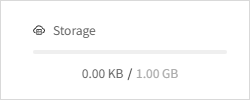
Storage capacity

Default capacity

  • Default capacity of 1GB is provided to free users. This capacity is calculated based on the total size of all items stored in My Drive and Trash combined. Therefore, not only the files stored in My Drive, but also the items you keep in the Trash are included in the used capacity. To help manage your storage, please clean up and delete unnecessary items regularly.

  • The current used capacity will be displayed as a numeric value.

When your storage is full

  • Delete unnecessary items: Delete files or folders you no longer need to free up space.

  • Empty Trash: Items in the Trash also count towards your storage, so please make sure to clean it up and empty it.

  • (Coming soon) Upgrade your plan: You can expand your storage space by purchasing additional capacity.

Restrictions when your storage is full:

  • You won't be able to upload or copy new items until you delete unnecessary items or free up space.

  • Alread stored folders and/or files will remain intact.

Impact of downgrading your plan

  • If you are on an additional storage plan and decide to downgrade, your alread stored folders and/or files will not be deleted.

  • However, you will not be able to upload or copy new items while you exceed the provided storage capacity.

  • While you are over capacity, you may see a warning message informing that your storage is full until you free up space or upgrade your plan again.

PreviousSearch
Copyrightⓒ Wizcore, Inc. All Rights Reserved.
Terms of ServicePrivacy Policy

Storage

  • Default capacity
  • When your storage is full
  • Impact of downgrading your plan
메뉴
  • CADian Release History
  • User Accounts
      • Sign Up (Create Account)
      • Sign In
      • 2-Step Sign In
      • Find Email Account
      • Find Password
      • Change Email Account
      • Change Password
      • 2-Step Verification
      • Delete Account
      • Restore Account
      • Login with ID
      • Find ID
      • Find Password
      • Find Email Address
      • Switch to Email
  • My Page
      • Change Email Account
      • Change Password
      • 2-Step Verification
      • Delete Account
      • Restore Account
      • Profile Image
      • Nickname
      • Name
      • Birthday
      • User Phone
      • Recovery Email
      • Industry
      • Company
      • Department
      • Change Language
      • Newsletter Subscription
      • Order History
      • Cart
      • Register Product
      • My Products
      • List
      • Register
  • License
    • Download CADian
    • Install CADian
    • Register License
    • Authorize Trial
  • File Manager
    • What's New
    • FAQ
      • Access
      • Browsers
      • Languages
      • Create Account
      • Sign In
      • Profile Settings
      • Create Folders
      • Upload Files
      • Download Files
      • File List
      • Open Files
      • Rename Items
      • Copy Files
      • Move Files
      • Delete Items
      • Share Items
      • Starred Items
      • Trash
      • Search
      • Storage
  • Web Viewer
    • What's New
    • FAQ
      • Access
      • Browsers
      • Languages
      • Create Account
      • Sign In
      • Profile Settings
      • Zoom and Pan
      • 3D Orbit
      • Switching Views
      • Selecting Entities
      • Properties
      • Layers
      • Model and Layout
      • Ruler
      • Text
      • Display and Hide UI
  • File Converter
    • What's New
    • FAQ
      • Create Account
      • Sign In
      • Profile Settings
      • Access
      • Browsers
      • Languages
      • File Types
      • File Upload
      • File Convert
  • Organization Console
    • Introduction
      • Create Organization
      • Organization Dashboard
      • View Members
      • Invite Member
      • Change Role & Remove
      • Transfer Ownership
      • View Groups
      • Create Group
      • Edit & Delete Group
      • View Serials
      • Register Serial
      • Remove Serial
      • Organization Info & Domain
      • Delete Organization
      • Activity Log
      • Member View Guide
      • Organization FAQ