CADianHelp Center
메뉴
  • CADian Release History
  • User Accounts
      • Sign Up (Create Account)
      • Sign In
      • 2-Step Sign In
      • Find Email Account
      • Find Password
      • Change Email Account
      • Change Password
      • 2-Step Verification
      • Delete Account
      • Restore Account
      • Login with ID
      • Find ID
      • Find Password
      • Find Email Address
      • Switch to Email
  • My Page
      • Change Email Account
      • Change Password
      • 2-Step Verification
      • Delete Account
      • Restore Account
      • Profile Image
      • Nickname
      • Name
      • Birthday
      • User Phone
      • Recovery Email
      • Industry
      • Company
      • Department
      • Change Language
      • Newsletter Subscription
      • Order History
      • Cart
      • Register Product
      • My Products
      • List
      • Register
  • License
    • Download CADian
    • Install CADian
    • Register License
    • Authorize Trial
  • File Manager
    • What's New
    • FAQ
      • Access
      • Browsers
      • Languages
      • Create Account
      • Sign In
      • Profile Settings
      • Create Folders
      • Upload Files
      • Download Files
      • File List
      • Open Files
      • Rename Items
      • Copy Files
      • Move Files
      • Delete Items
      • Share Items
      • Starred Items
      • Trash
      • Search
      • Storage
  • Web Viewer
    • What's New
    • FAQ
      • Access
      • Browsers
      • Languages
      • Create Account
      • Sign In
      • Profile Settings
      • Zoom and Pan
      • 3D Orbit
      • Switching Views
      • Selecting Entities
      • Properties
      • Layers
      • Model and Layout
      • Ruler
      • Text
      • Display and Hide UI
  • File Converter
    • What's New
    • FAQ
      • Create Account
      • Sign In
      • Profile Settings
      • Access
      • Browsers
      • Languages
      • File Types
      • File Upload
      • File Convert
  • Organization Console
    • Introduction
      • Create Organization
      • Organization Dashboard
      • View Members
      • Invite Member
      • Change Role & Remove
      • Transfer Ownership
      • View Groups
      • Create Group
      • Edit & Delete Group
      • View Serials
      • Register Serial
      • Remove Serial
      • Organization Info & Domain
      • Delete Organization
      • Activity Log
      • Member View Guide
      • Organization FAQ
  1. Help Center
  2. License
  3. Register License
Register License

After installing CADian, you must register the authority code if you are ① a first-time user or ② have changed your computer.

There are two ways to register the CADian authority code, as shown below.

Online Registration (When the device is connected to the Internet)

  1. Select Register by On-Line and click the Next button.
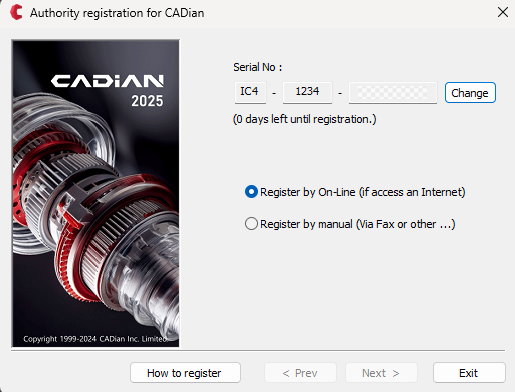
    CADian Authority Code Online Registration

  2. Enter your CADian Email or ID account and password, then click the Next button.
    ※ If you do not have an account yet, click the Sign up... button to create one from CADian website first.
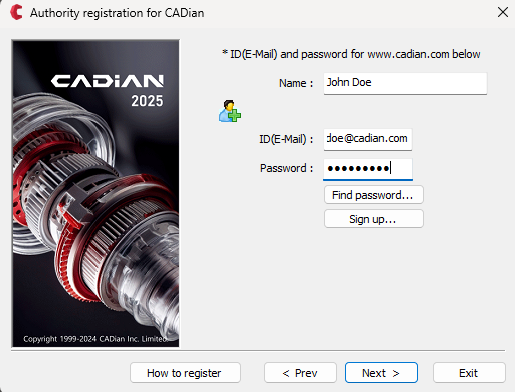
    CADian Authority Code Registration - Login

  3. If you have previously registered your serial number on another computer,
    you will see a message stating, "This Serial Number has already been registered by another user." Click Yes to proceed with re-authentication.
    If this message does not appear, proceed to the next step.
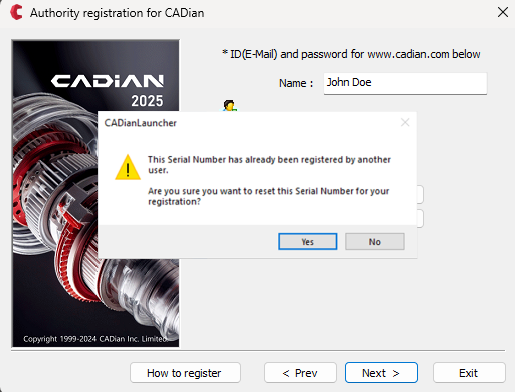
    CADian Authority Code Registration - Already in Use

  4. Verify that your registration information is correct, then click the Close button.

  5. Online registration is now complete. Click the Finish button to start CADian application.
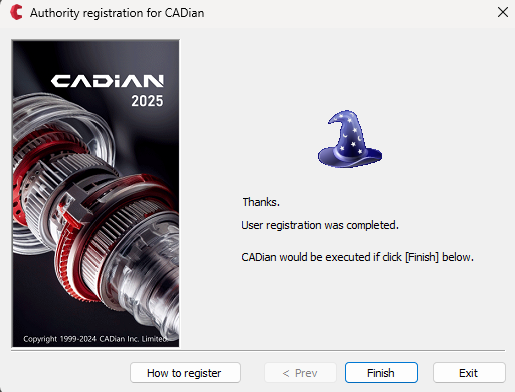
    CADian Authority Code Registration - Complete

  6. Authority code registration is only required once. CADian will launch automatically afterwards.

Manual Registration (When the device is not connected to the Internet)

If your current device is not connected to the Internet, refer to this guide for manual registration.

When Do I Need to Re-register Authority Code?

If you reinstall CADian due to system changes or formatting, you will need to request a new authority code.

Related Topics

  • Download Installation Files

  • Install the Product

PreviousInstall CADianNextAuthorize Trial
Copyrightⓒ Wizcore, Inc. All Rights Reserved.
Terms of ServicePrivacy Policy

Register License

  • Online Registration (When the device is connected to the Internet)
  • Manual Registration (When the device is not connected to the Internet)
  • When Do I Need to Re-register Authority Code?
메뉴
  • CADian Release History
  • User Accounts
      • Sign Up (Create Account)
      • Sign In
      • 2-Step Sign In
      • Find Email Account
      • Find Password
      • Change Email Account
      • Change Password
      • 2-Step Verification
      • Delete Account
      • Restore Account
      • Login with ID
      • Find ID
      • Find Password
      • Find Email Address
      • Switch to Email
  • My Page
      • Change Email Account
      • Change Password
      • 2-Step Verification
      • Delete Account
      • Restore Account
      • Profile Image
      • Nickname
      • Name
      • Birthday
      • User Phone
      • Recovery Email
      • Industry
      • Company
      • Department
      • Change Language
      • Newsletter Subscription
      • Order History
      • Cart
      • Register Product
      • My Products
      • List
      • Register
  • License
    • Download CADian
    • Install CADian
    • Register License
    • Authorize Trial
  • File Manager
    • What's New
    • FAQ
      • Access
      • Browsers
      • Languages
      • Create Account
      • Sign In
      • Profile Settings
      • Create Folders
      • Upload Files
      • Download Files
      • File List
      • Open Files
      • Rename Items
      • Copy Files
      • Move Files
      • Delete Items
      • Share Items
      • Starred Items
      • Trash
      • Search
      • Storage
  • Web Viewer
    • What's New
    • FAQ
      • Access
      • Browsers
      • Languages
      • Create Account
      • Sign In
      • Profile Settings
      • Zoom and Pan
      • 3D Orbit
      • Switching Views
      • Selecting Entities
      • Properties
      • Layers
      • Model and Layout
      • Ruler
      • Text
      • Display and Hide UI
  • File Converter
    • What's New
    • FAQ
      • Create Account
      • Sign In
      • Profile Settings
      • Access
      • Browsers
      • Languages
      • File Types
      • File Upload
      • File Convert
  • Organization Console
    • Introduction
      • Create Organization
      • Organization Dashboard
      • View Members
      • Invite Member
      • Change Role & Remove
      • Transfer Ownership
      • View Groups
      • Create Group
      • Edit & Delete Group
      • View Serials
      • Register Serial
      • Remove Serial
      • Organization Info & Domain
      • Delete Organization
      • Activity Log
      • Member View Guide
      • Organization FAQ