
Selecting Entities
To view the properties information of an entity, please select the entity.
You can select entities using the following methods:
Click the Entity :
Move the mouse cursor over the entity you want to select and click on it.
Only the specific entity you clicked on will be selected.
Window Select
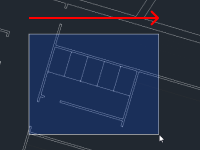
Click an arbitrary starting point and drag the mouse from left to right, using the selection box to enclose entities.
All entities fully enclosed within the selection box will be added to the selection set.
Crossing Select
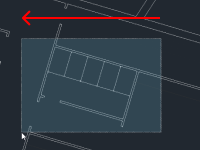
Click an arbitrary starting point and drag the mouse from right to left, using the selection box to enclose entities.
All entities within or partially crossing the selection box will be added to the selection set.