
Rename a group, edit its description, manage its members, or delete it. Available to Owner · Admin only.
In the list, click the Manage(⋮) column of the target group's row to show the Edit Group · Manage Members · Delete Group menu.
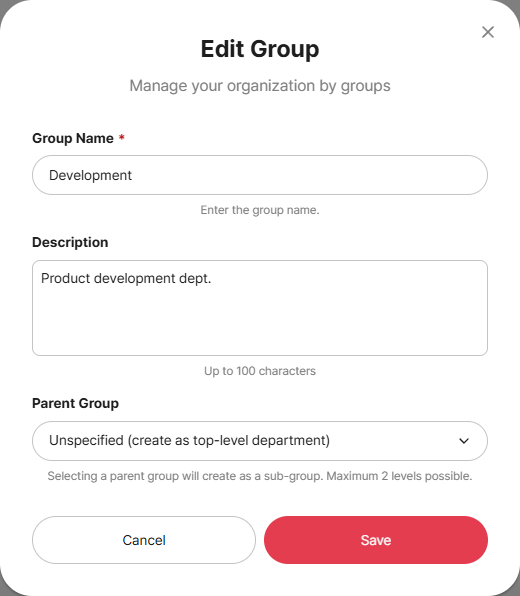
Edit Group
Select Manage(⋮) > Edit Group to open the edit modal.
Change the group name · description · parent group and click Save.
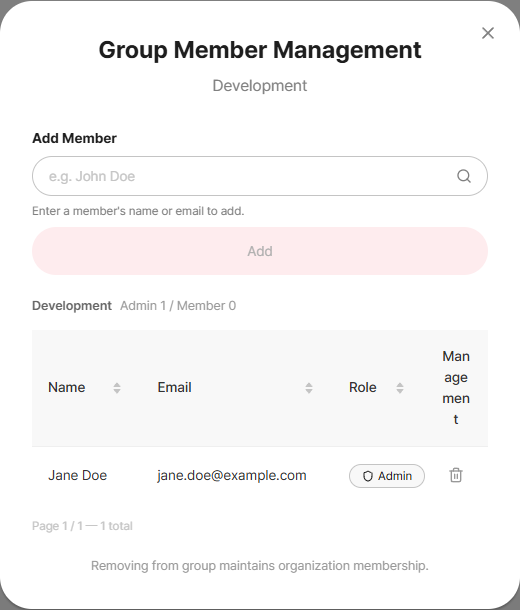
Manage Members
Select Manage(⋮) > Manage Members to open the group member management modal.
In the Add Member search box, find a member by name/email and Add them, or Remove from Group (trash icon) from the list.
Removing from the group keeps the organization membership.
Delete Group
Select Manage(⋮) > Delete Group and confirm.
Deleting a group does not remove members from the organization. (Only the group membership is released.)
Related Topics